Tracking your progress
Logging a workout takes seconds. The payoff is everything DropSet builds from it automatically: a calendar of every session, analytics that spot trends you'd never notice, a board of personal records, and goals that forecast their own finish date.
None of it needs any extra input. Every completed set feeds History, Insights, the PR Board and Goals at the same time — this page explains what lives where.
Last reviewed 2026-07-10 · matches app v0.9.0.32
History: your training calendar
The History panel opens on a month calendar — three months side by side on wider screens — with a dot on every day you trained, and a full-year heatmap below it so a consistent block of training (or a gap) is visible at a glance. Tap a marked day to open that session.
Past workouts aren't read-only. Open a session and choose Edit Workout to fix a typo, change a set's type, or add and remove sets after the fact. The same menu offers Share workout card (a shareable image of the session) and Save as New Routine, which turns any past workout into a reusable routine in one step.
The streak chip at the top mirrors the dashboard's, so the number always matches. A streak survives up to 3 rest days; the chip turns amber at 2 and red at 3 to warn you before it breaks.
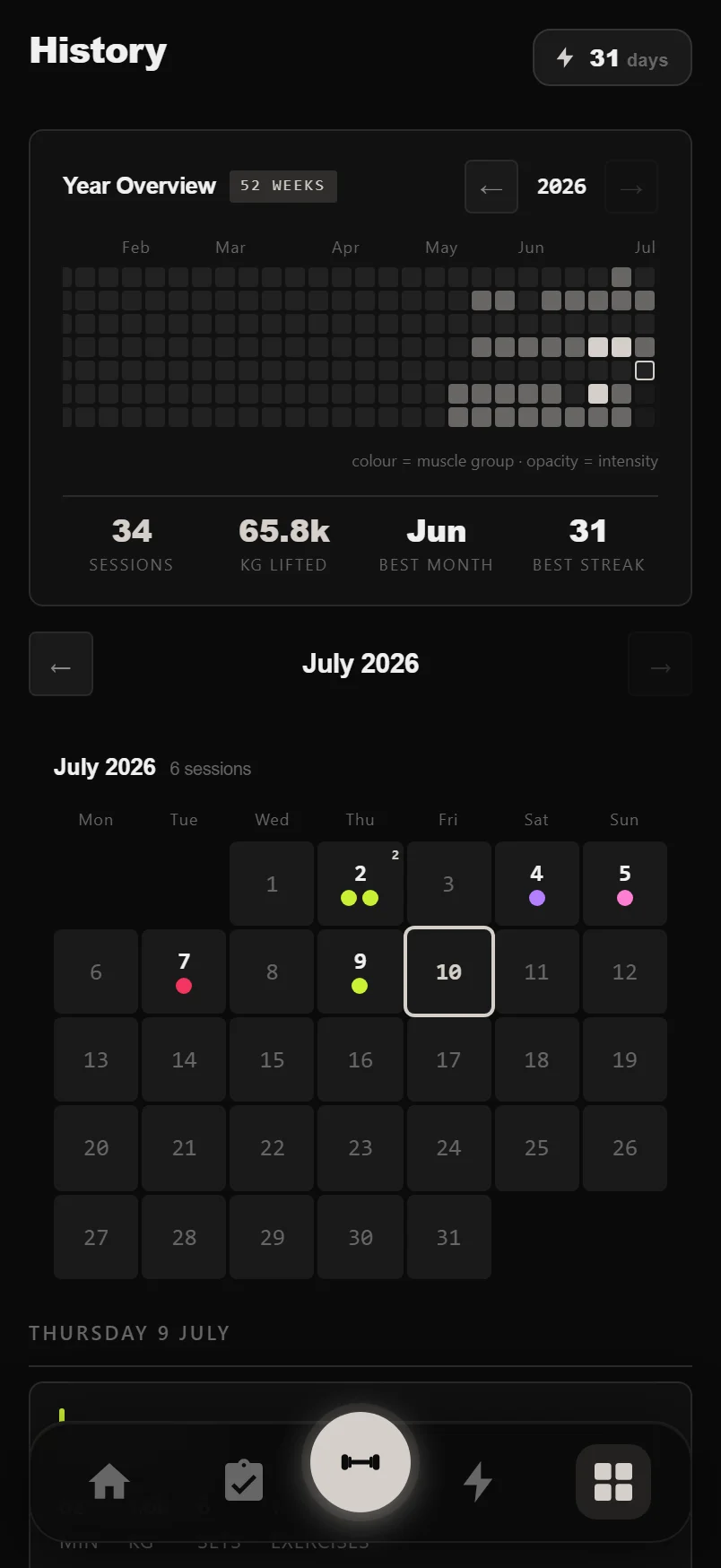
Swipe the calendar to change months and the year heatmap to view previous years — no need to reach for the arrows.
Tap the streak chip for a plain-English explainer of exactly how streaks are counted.
Insights: four swipeable tabs
Insights splits analytics across four tabs — Summary, Strength, Volume and Program — and you can swipe left or right to move between them.
Summary is the health check: a weekly readiness score comparing this week's load to your recent average, your best session this month, a 12-week consistency score, training frequency charts, a time-of-day heatmap of when you actually train, and a this-week-versus-last-week volume comparison by muscle.
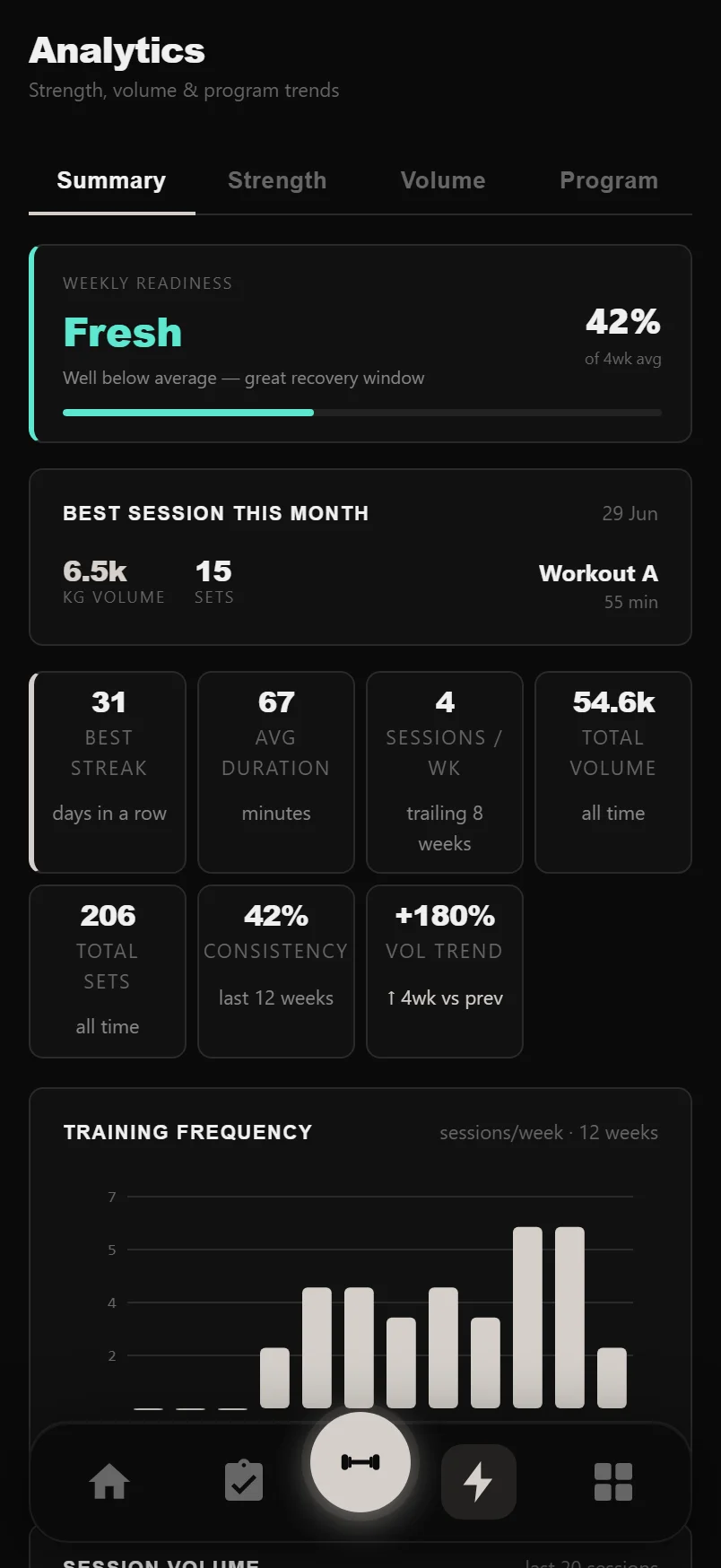
Charts with a funnel icon open a time-range picker: last 7, 30 or 90 days, last year, or all time.
The Strength tab and estimated 1RM
DropSet tracks strength through estimated 1RM (e1RM): the single-rep max implied by any set, calculated from weight and reps with the Epley formula. It's how 100 kg for 5 can be compared against 110 kg for 2 — and it's the same calculation on every screen in the app.
The Strength tab is built around it. Compare Exercises plots any lifts side by side over your chosen date range. The Strength Index adds up your Big 4 e1RMs — Squat, Bench Press, Deadlift and Overhead Press — into one number you can watch climb. A muscle-balance radar shows where your volume is skewed, and Near PRs lists every lift that came within 10% of a record in the last 4 weeks — exactly what's ripe for an attempt.
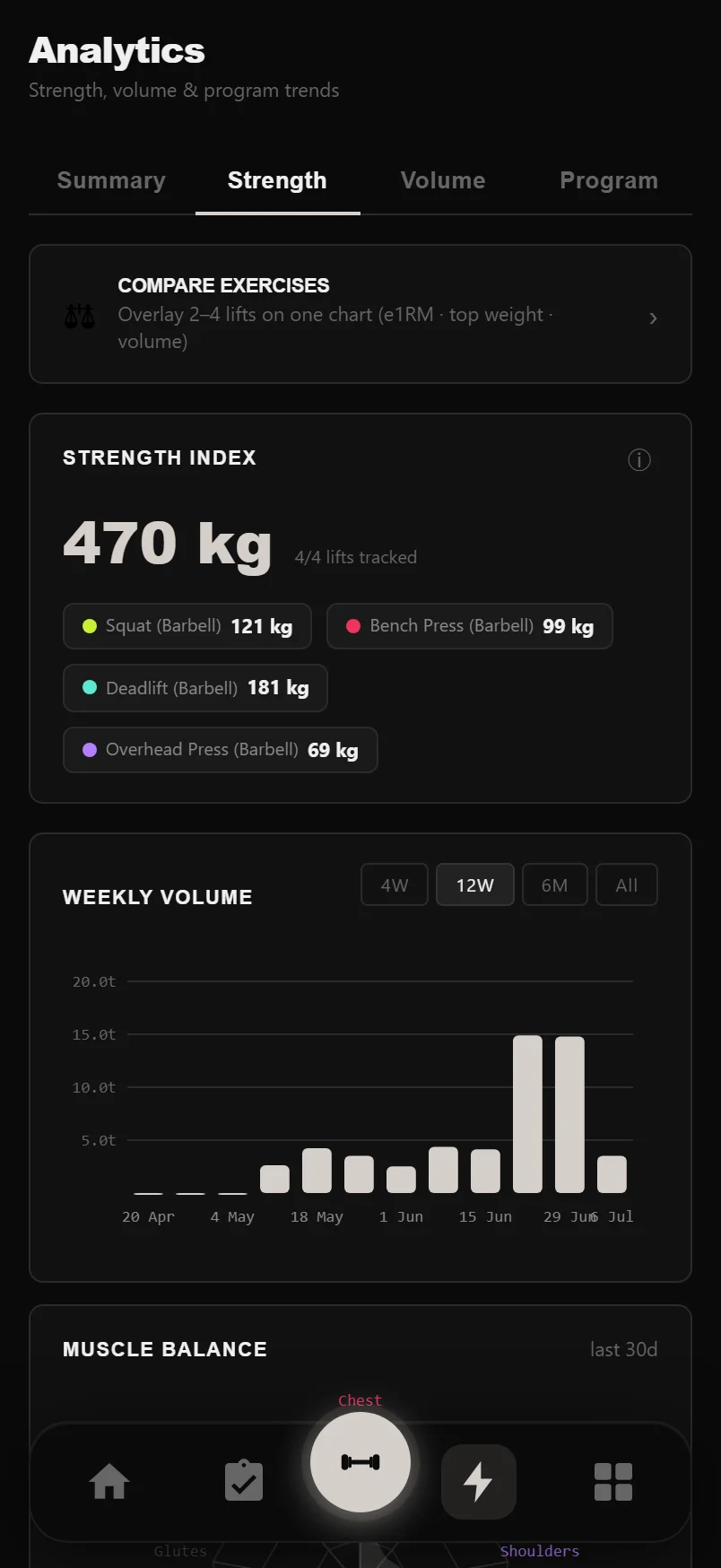
Tap the small info buttons on the Strength Index and ACWR cards for a one-paragraph explanation of how each number is computed.
Volume, recovery and the Program tab
The Volume tab watches your workload. A muscle frequency heatmap shows sets per week per muscle over the last 12 weeks, and the ACWR chart (acute:chronic workload ratio) compares this week's volume to your 4-week rolling average, with the optimal zone marked — too high risks overreaching, too low means undertraining.
A fatigue and recovery card tracks volume load, RPE trend and frequency, and a deload recommendation watches four warning signals and says plainly when it's time to back off. If you sync sleep through Health Connect, a Sleep & Performance section shows how your volume differs after good and poor nights. The Program tab rounds things out with per-program analytics for whatever plan you're running.
The PR Board
The PR Board keeps one record card per exercise across three tabs: Est. 1RM, Best Weight and Volume. Each card shows the record, the set that produced it, and how much it beat your previous best by. The board remembers which tab you were on when you come back.
Records are strict by design: warm-ups, partials and rest-pause sets never count towards weight or e1RM records, and your very first set of an exercise sets the baseline rather than being awarded as a PR — a record has to beat something. Sort by date, value or name, and use the filter button to narrow the board to one muscle group.
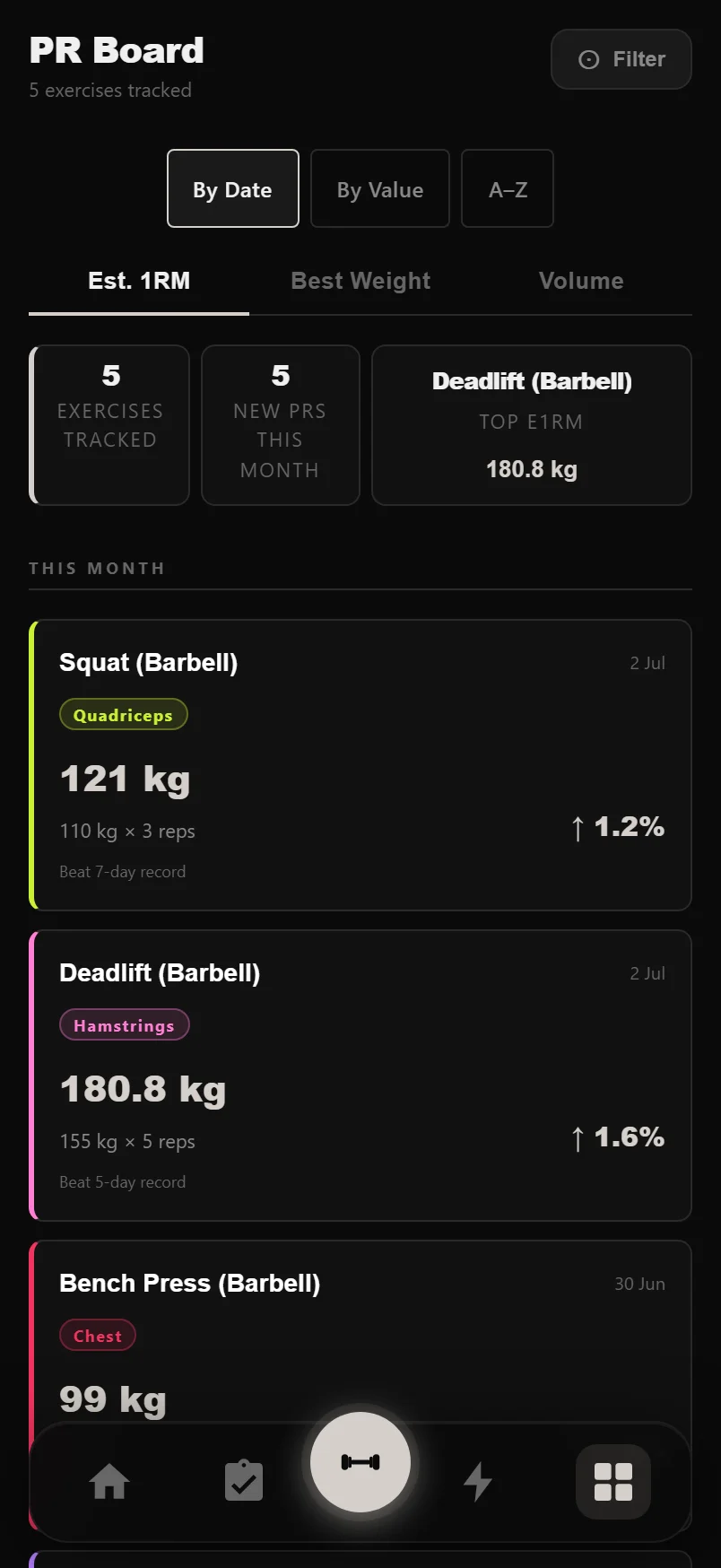
Swipe left or right on the grid to cycle between the three record types.
Tap any PR tile to jump straight to that exercise's detail page and full history.
Goals and the ETA forecast
You can set up to 10 goals across nine types: body weight, body fat %, max weight or estimated 1RM on a lift, reps at a given weight, cardio sessions, running distance, workout count and total volume — the count-based ones scoped per week, month or year. Pin up to 3 goals to your dashboard, and archive finished ones to keep the list clean.
Strength goals forecast their own finish date. DropSet fits a trend line through your per-session bests for that lift and projects when it crosses your target — that's the date on the card, projected from your strength trend. With sparse history it falls back to a simpler estimate and marks it as rough; if your trend is flat, the card says 'Keep logging' instead of inventing a date.
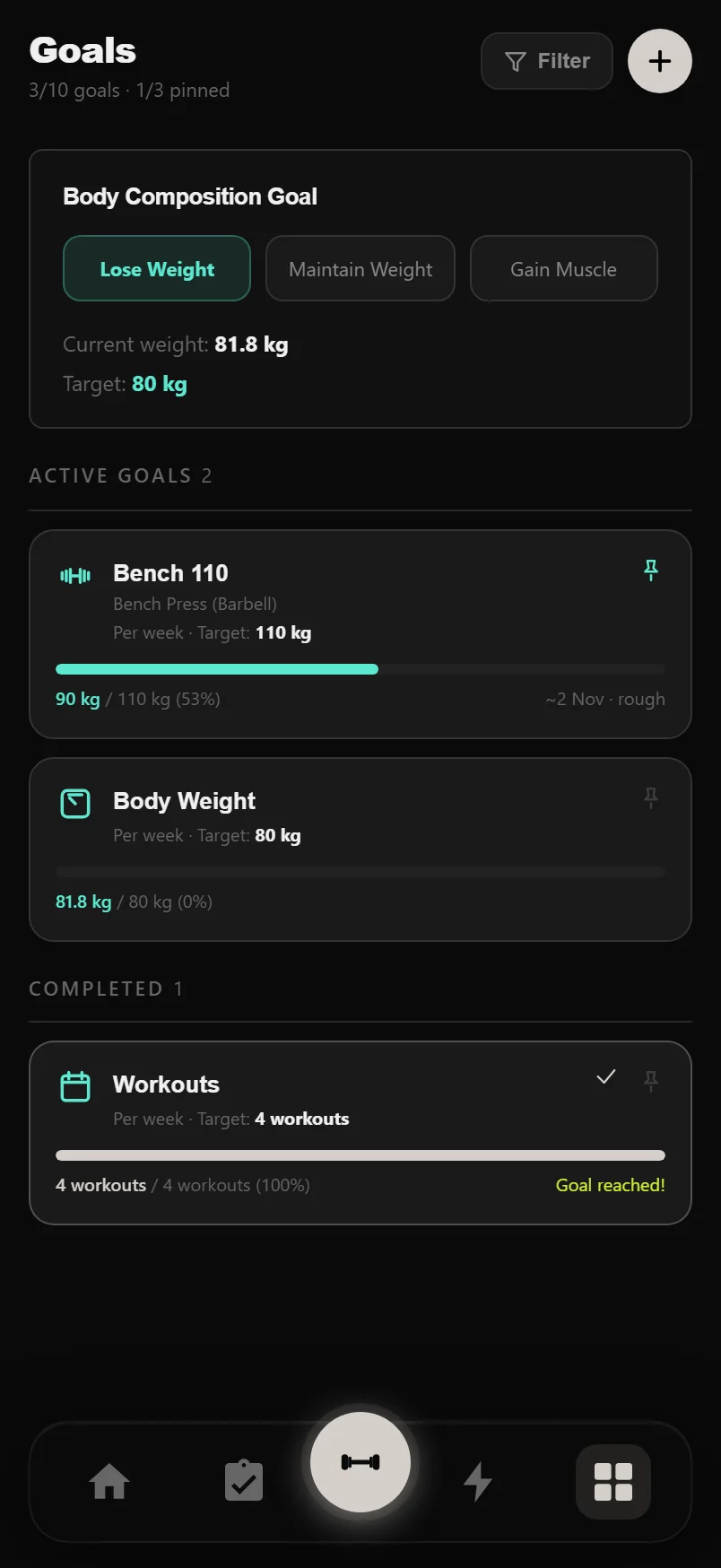
Tap any goal card to edit it — the pin icon in its corner toggles it on or off the dashboard without opening the editor.
Common questions
How is estimated 1RM calculated?
From your best set using the Epley formula: weight multiplied by (1 + reps/30). It's the same calculation everywhere in DropSet — logger, PR board, analytics and goals — so numbers always agree across screens.
Why didn't my set count as a PR?
Records are strict: warm-up, partial and rest-pause sets never qualify for weight or e1RM records, and volume records count partials as half-reps. The very first qualifying set of an exercise sets your baseline rather than earning a PR. If a heavy set didn't register, check its set type.
Can I edit a workout I logged last week?
Yes. Open it from the History calendar, choose Edit Workout, and you can change weights and reps, switch set types, and add or remove sets — your PRs and analytics update to match.
What does 'rough' mean next to a goal's ETA?
The forecast didn't have enough consistent history to fit a reliable trend line, so it used a simpler estimate based on your progress since the goal was created. Keep logging that lift and it upgrades to a trend-based projection.
Put it into practice
DropSet is free during beta — 50 proven programs, automatic progression, rest timers and PR tracking, all on your phone.