Cardio, nutrition and body tracking
Strength is the core of DropSet, but progress doesn't only live in the gym. The app also tracks your cardio, your daily nutrition, and your body itself — weight, measurements and photos — so the work and the results sit in one place.
None of it asks for busywork: cardio flows in from your workouts and Health Connect, nutrition syncs as one record per day, and photos back themselves up. Find Cardio, Nutrition, Body and Gallery under the More tab.
Last reviewed 2026-07-10 · matches app v0.9.0.32
Cardio: tracked, not typed
Open More > Cardio and every session is already there: cardio exercises logged inside a workout appear automatically, and sessions from other apps sync in through Health Connect. There's deliberately no separate cardio diary to maintain.
For your chosen time range you get six stats — sessions, total distance, total minutes, best running pace, average heart rate and estimated calories — plus trend charts for distance, pace (running only), heart rate, heart-rate zones and duration, and a By Activity list with per-activity records.
Synced sessions carry an Edit button for correcting distance, duration, heart rate, elevation and notes. Enter a heart rate and DropSet shows your training zone (Z1-Z5) and estimates calories from it.
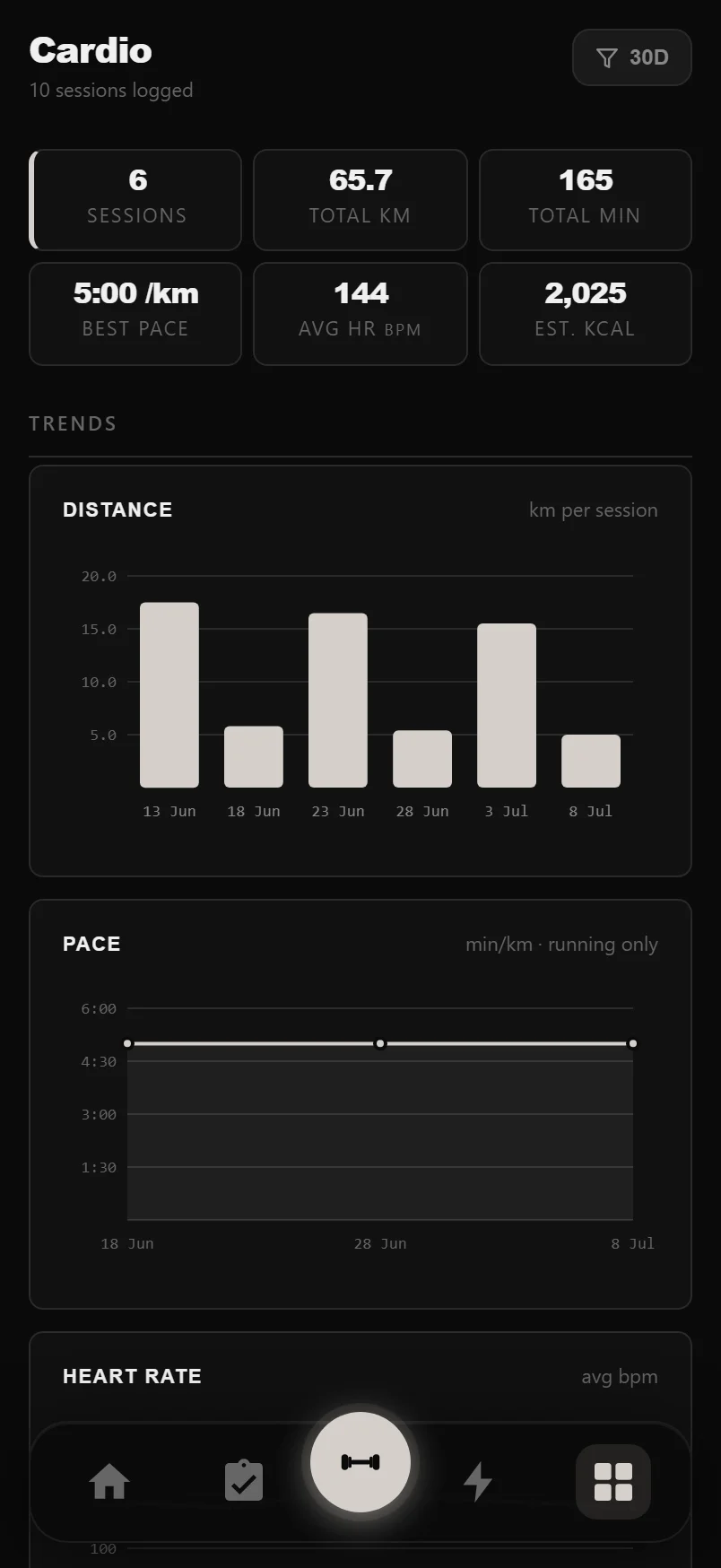
The funnel button in the header switches the whole panel between 7-day, 30-day, 90-day, 1-year and all-time views — and it remembers your choice.
Running the timer in a workout
Add any cardio exercise to a workout and its set rows swap weight and reps for distance, duration and an editable REST cell. Tap START and the timer runs the set: a planned duration counts down with a progress ring and a Pause button; no duration means a count-up stopwatch — tap Finish and the elapsed time is logged.
When every set is done, the button turns into LOG ANOTHER: one tap adds a fresh round and starts it immediately.
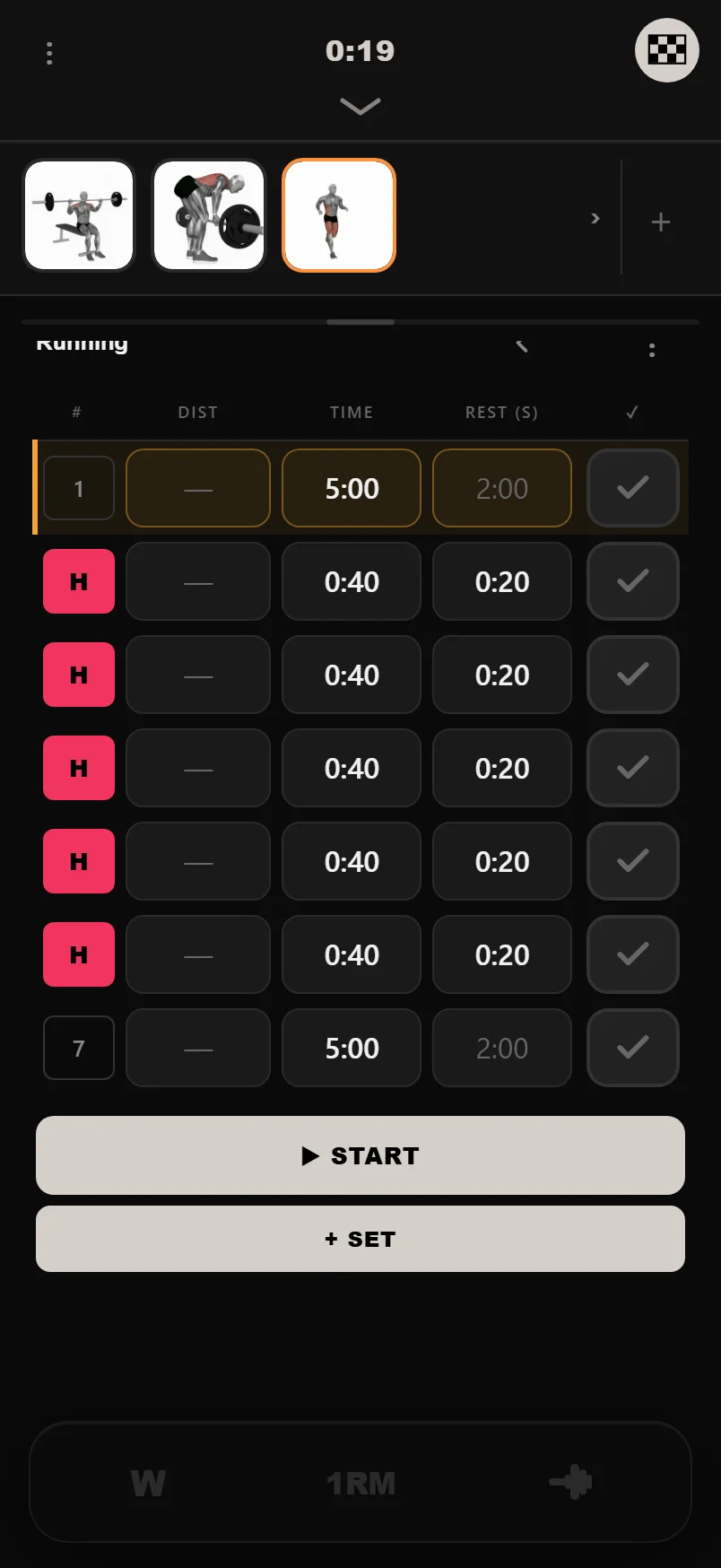
Type plain seconds into the REST cell and it formats itself — 90 becomes 1:30. Set it to 0 and the timer skips rest entirely, chaining straight into the next round.
Tap a cardio set's number badge to choose Steady or HIIT for that set; long-press the badge to delete it.
HIIT that runs itself
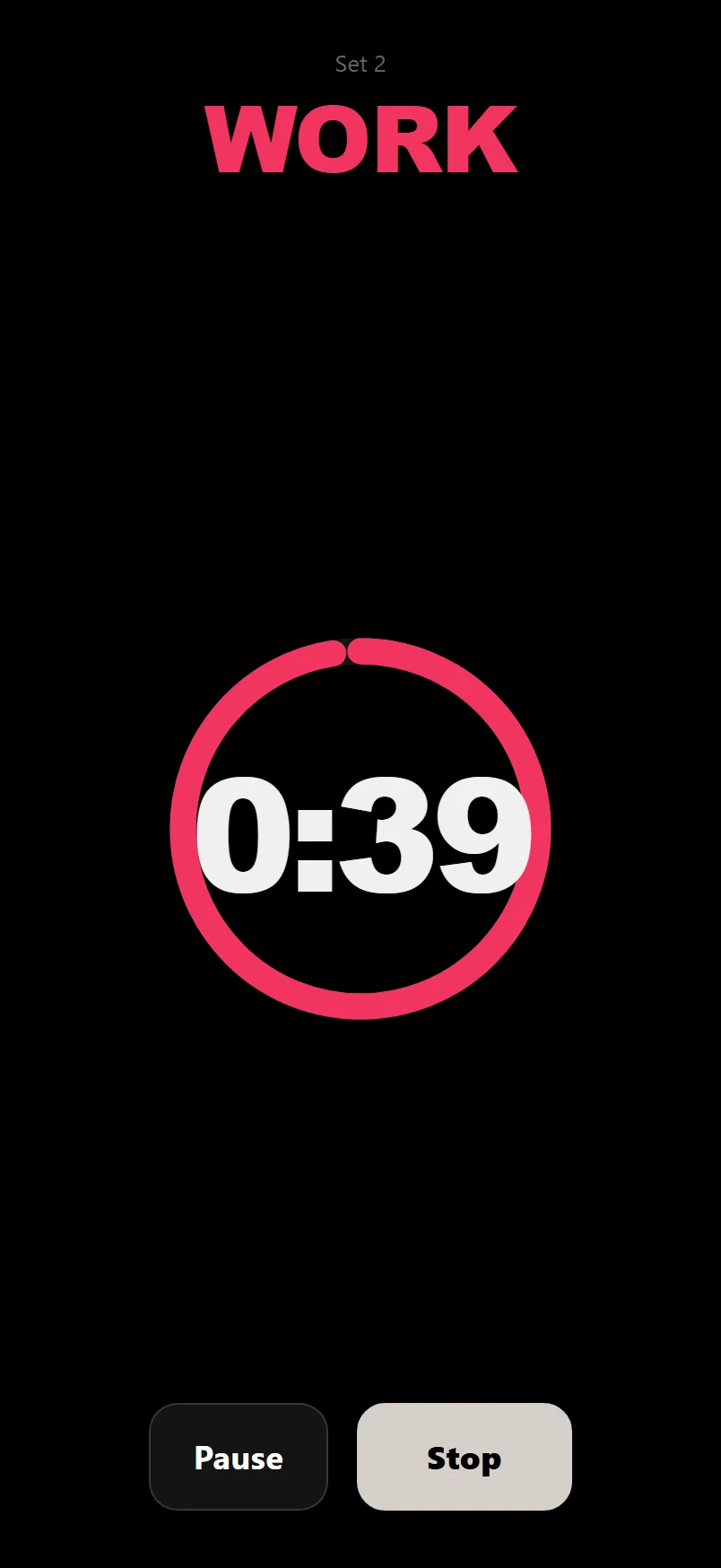
Mark sets as HIIT and the logger runs them as real intervals: each set's duration is the work period, its rest is the recovery, and sets auto-chain — work, rest, work — with the set number and phase (WORK or REST) front and centre. HIIT work gets the urgent red ring; steady efforts stay calm white.
HIIT blocks in DropSet's built-in programs are automatically bracketed by a 5-minute easy warm-up and cool-down. The warm-up chains straight into round one, and the moment your last round ends the cool-down starts on its own — you're never sent cold into all-out intervals, and never left standing when they finish.
Nutrition: one record per day
Nutrition is built around syncing rather than typing. Connect Health Connect and daily calories and macros flow in from the nutrition app you already use — merged into exactly one record per day, so re-syncing never creates duplicates.
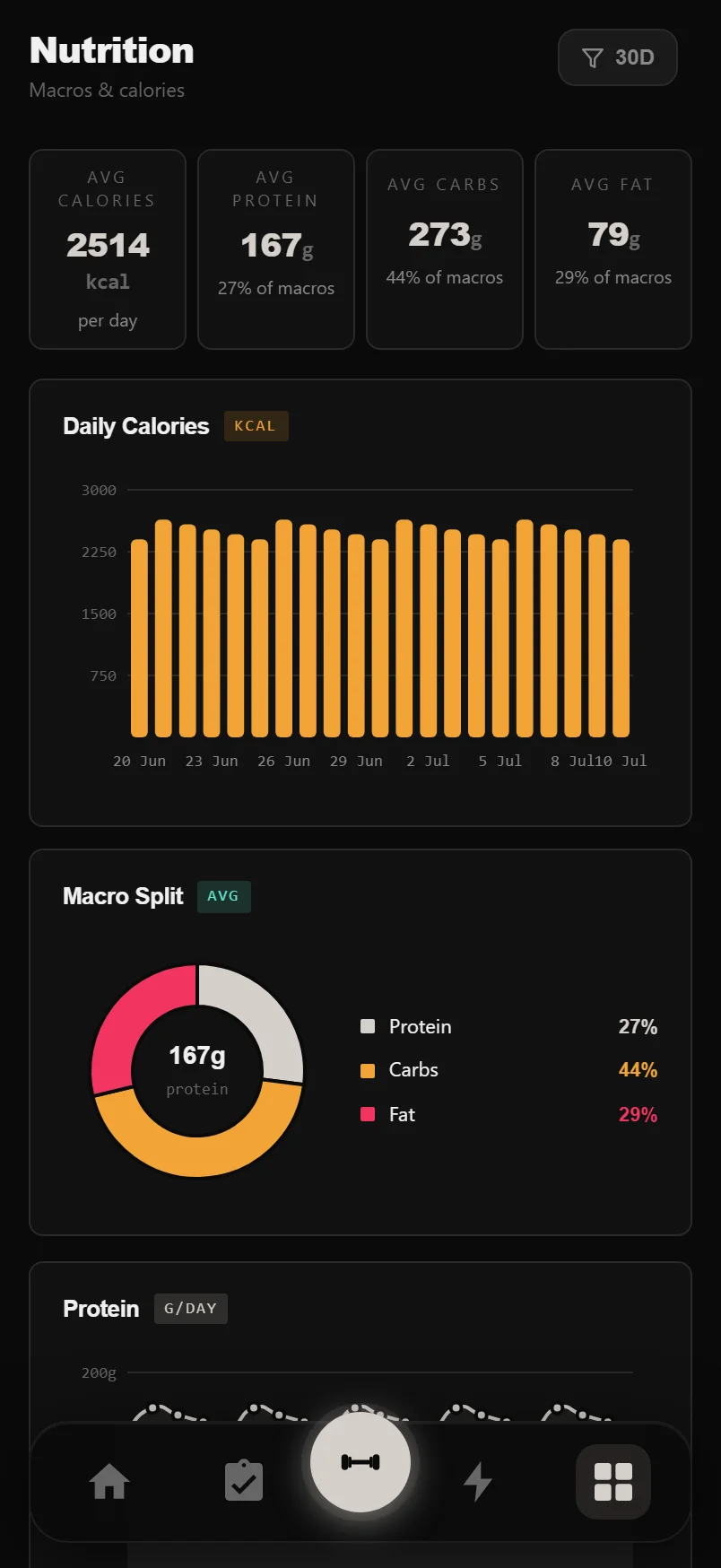
You get average calories, protein, carbs and fat, a daily calories chart, a macro split donut, and protein, carbs and fat trend lines. Edit any day with the pencil button in Log History — the day stays a single record.
Water has its own quick-add card: tap +250, +330, +500 or +750 ml (or Custom) and today's total updates instantly against a 2,000 ml target bar.
Editing a day's macros? Leave the calories field blank — DropSet calculates it from protein, carbs and fat (4/4/9 kcal per gram) and fills it in for you.
Weight, body fat and measurements
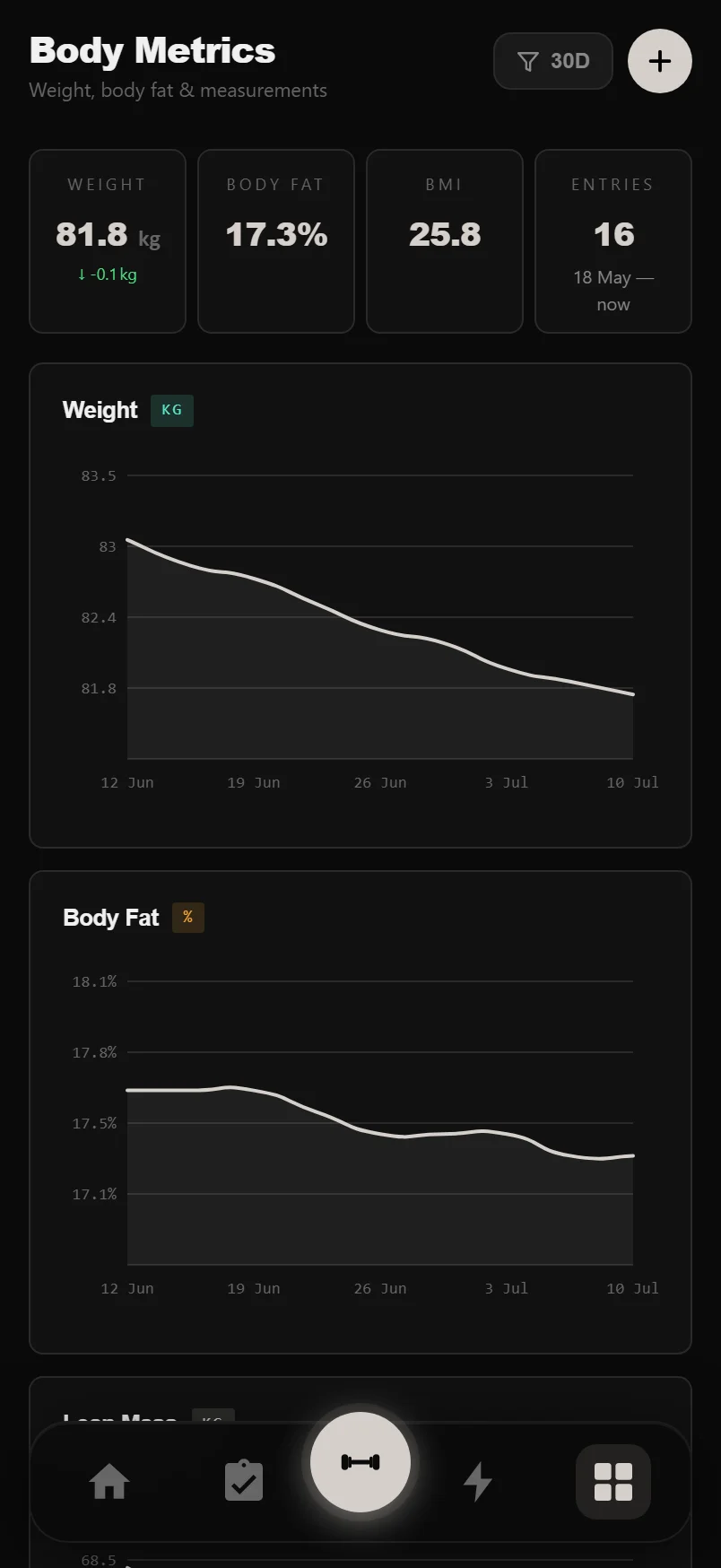
Body Metrics is the long-game page. Tap the + button to log today: weight (kg or lbs, following your unit setting), body fat percent, optional lean and bone mass, and ten tape measurements from neck to calves. Stat cards show your latest weight, body fat and BMI with up/down deltas against your previous entry.
Charts cover weight, body fat, lean mass, BMI trend and any single measurement you pick. Sleep and water sit alongside — sleep syncs from Health Connect, water comes straight from the Nutrition page.
Tap Manage on the Measurements card to open one measurement's full history — edit or delete any past value right in the list.
Progress photos with a ghost
The Gallery keeps progress photos in a date-labelled grid — tap one for a lightbox (swipe between photos, share, save, delete), with filter tabs separating body shots from post-workout photos.
The camera shows a ghost — a faint overlay of your last shot — so every photo lines up with the same framing and pose; the post-workout photo uses the same camera. Select to Compare puts any two photos side by side with their dates, always letterboxed to fit, never cropped or stretched, with Swap, Save and Share.
On Android, every photo is also saved to a DropSet album in your device gallery, so it backs up with your other photos. Reinstall the app and the gallery restores itself from that album — once, with no duplicates — and a manual Restore from device album button is there if you need it.
Long-press any thumbnail in the grid to start a compare selection — pick a second photo and the side-by-side opens itself.
Turn photos into a time-lapse
With three or more photos, the Time-lapse button builds a crossfading, date-stamped, DropSet-branded video of your transformation, framed at 4:5 portrait for social feeds. Drag the filmstrip trimmer's handles to pick the exact stretch you want; a live label shows the photos and weeks in range.
Download or Share exports a real video file. On devices that can't encode video, DropSet falls back to a branded before/after image, so you always get something worth posting.
Tap the small preview to play the time-lapse full screen; tap again to come back to the trimmer.
In the Android app, the Rotate button flips the composer to landscape for a much wider filmstrip while you trim.
Common questions
Can I log a cardio session by hand?
There's no separate cardio diary — sessions come from cardio exercises logged in your workouts and from Health Connect. You can correct a synced session's distance, duration, heart rate, elevation and notes with its Edit button.
How do I get my meals into DropSet?
Connect Health Connect in Settings and your daily calories and macros sync from the nutrition app you already use, merged into one record per day. You can edit any day's numbers from the Log History table.
Do my progress photos upload to the cloud?
No. Photos stay on your device — in the app and in the DropSet album in your device gallery, which backs up with your normal photo backup. Reinstalling the app restores the gallery from that album automatically.
What's the difference between Steady and HIIT sets?
It's your call per set: tap the set badge in the logger to mark a set as HIIT. HIIT rounds auto-chain through work and rest with the red interval styling; a steady set runs as one continuous effort.
Can I use miles instead of kilometres?
Yes — distances you log follow the km/miles preference in Settings, and body weight follows your kg/lbs setting the same way.
Put it into practice
DropSet is free during beta — 50 proven programs, automatic progression, rest timers and PR tracking, all on your phone.