The exercise library
DropSet ships with 415 built-in exercises covering barbells, dumbbells, machines, cables, kettlebells, bands and bodyweight work. 308+ of them have how-to demo videos, and every single one comes with step-by-step instructions and form tips.
The library isn't just a list of names. Every exercise is also a record of you: tap into any exercise and you get your personal records, progression charts and every set you've ever logged on it. This page covers finding exercises, reading the detail view, and making the library your own with custom exercises and preferences.
Last reviewed 2026-07-10 · matches app v0.9.0.32
Finding an exercise
Open Exercises from the More menu (or tap an exercise name anywhere in the app). The picker has a search box that matches on name and muscle - typing "db press" finds every dumbbell press - and a Filter button that narrows the list to one body part, from chest and lats down to forearms and neck.
Star an exercise as a favourite on its detail page and it floats to the top of every exercise list from then on, so the handful of lifts you actually do are always first.
Exercises with a video show a small play button in the picker - tap it to watch the demo without leaving the list.
In the logger, long-press an exercise name to play its how-to video instantly. A normal tap opens the full detail page.
The exercise detail view
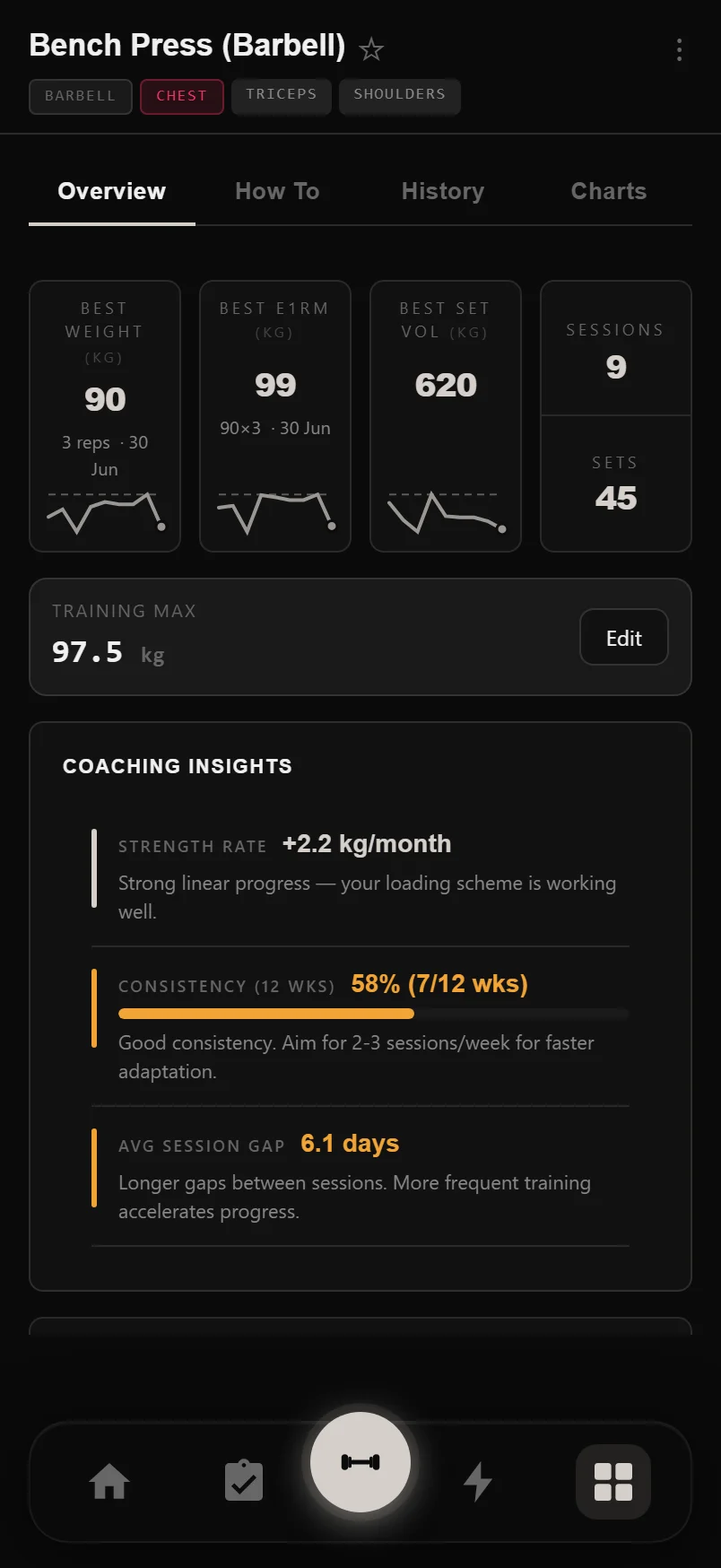
Each exercise page has four tabs. Overview shows your records - best weight, best estimated 1RM and best single-set volume - each with a sparkline of your last 90 days and a dashed line marking your all-time record, so you can see at a glance how close you are to it. Below that sits your Training Max (used by percentage-based programs), which warns you when it's more than six weeks old.
How To holds the demo video, step-by-step instructions and form tips. History lists every set you've ever logged, grouped by session and month, with set-type badges and a trophy on record-setting sets. Charts adds full progression graphs: estimated 1RM, session volume, average reps, best weight, RPE trend, set-type distribution and training frequency - plus coaching insights like plateau detection.
Tap the three-dot menu on any exercise for quick actions: bench angle, equipment tags, a pinned note, duplicate and compare.
Per-exercise preferences
From the three-dot menu you can attach a pinned note to any exercise - seat height, grip width, whatever you need to remember - and it shows up on the How To tab and in the logger. Paste a URL into the note and it becomes a tappable link, handy for a technique video you keep coming back to.
You can also set default equipment tags (which bar, which handle) and a default bench angle for incline work. Favourites, notes, training maxes and these defaults all sync to your account, so they follow you across devices.
Pin up to four exercises in Exercise Analysis to get always-visible cards with e1RM and volume trends, plus a progressing / plateau / declining badge.
Custom exercises
Tap the + button in the exercise picker to create your own exercise: name it, pick primary and secondary muscles, an equipment category, and what to track - weight and reps, reps only, time, distance, and more.
Custom exercises sync to your account and are included in full JSON backups. When you import history from Strong or Hevy, any exercise DropSet can't match to its library is created as a custom exercise automatically, so no data is dropped.
You can't edit a built-in exercise, but you can duplicate one - the copy is fully editable, so it's the fastest way to make a variation.
Tidying up equipment tags
If your gym has no safety bar or trap bar, you don't need those tags cluttering every equipment list. In Settings under Equipment you can hide any built-in tag with a tap, add your own custom tags, and restore hidden ones later if your setup changes.
Common questions
How many exercises does DropSet include?
415 built-in exercises, 308+ of them with how-to demo videos, plus any custom exercises you create yourself.
Can I watch an exercise video without opening its page?
Yes. Tap the play button next to it in the exercise picker, or long-press its name in the logger to play the video instantly.
Do my custom exercises transfer to a new phone?
Yes. Custom exercises sync to your account and are included in full JSON backups, so they come back when you sign in on a new device.
What happens to exercises I import from Strong or Hevy?
DropSet matches imported names to its own library where it can. Anything it can't match is created as a custom exercise automatically, so your history stays intact.
Can I edit a built-in exercise?
Not directly - built-ins are shared by everyone. Duplicate it instead: the copy is a custom exercise you can rename, re-categorise and change tracking on.
Put it into practice
DropSet is free during beta — 50 proven programs, automatic progression, rest timers and PR tracking, all on your phone.