Build your own program
DropSet ships 50 ready-made programs, but you're never limited to them. The program builder lets you create your own from scratch — your split, your exercises, your set and rep schemes — and, crucially, attach automatic progression so the app works out the next weight for you exactly as it does for a built-in program. Once it's built, a custom program behaves identically to any in the catalog: it schedules your sessions, tracks your progress and puts the weight on the bar.
This guide walks through creating one end to end: setting it up, filling in your training days, and turning on the progression that makes it run itself.
Last reviewed 2026-07-17 · matches app v0.9.0.54
Starting a new program
Open the Programs tab and choose Create a program — the 'Build your own from scratch' option. You'll get a short setup sheet that defines the shape of the program before you add any exercises. Nothing here is permanent; you can change all of it later, so don't overthink the first pass.
The two required fields are a program name and at least one training day — everything else has a sensible default. Give it a name you'll recognise (for example 'My Push / Pull / Legs'), and the builder does the rest of the scaffolding for you.
Setting it up
The setup sheet has five things to set. Program name is how it appears in your library. Experience level — Beginner, Intermediate or Advanced — is a label that helps you and others place the program later. Goal picks the training bias: Strength, Powerbuilding, Hypertrophy, Aesthetic, Athletic, Powerlifting or Fat Loss. Training days are the days of the week you'll train in week one — pick as many as your split needs, and the builder creates one session for each. Length in weeks sets how long a cycle runs before it repeats or ends.
There's also a Recurring toggle. Leave it on for an ongoing program that loops week after week (most strength and hypertrophy plans), or turn it off for a fixed-length block that finishes after its final week — useful for a set peaking or fat-loss phase. Tap Create program and the builder opens with an empty session for each training day you chose.
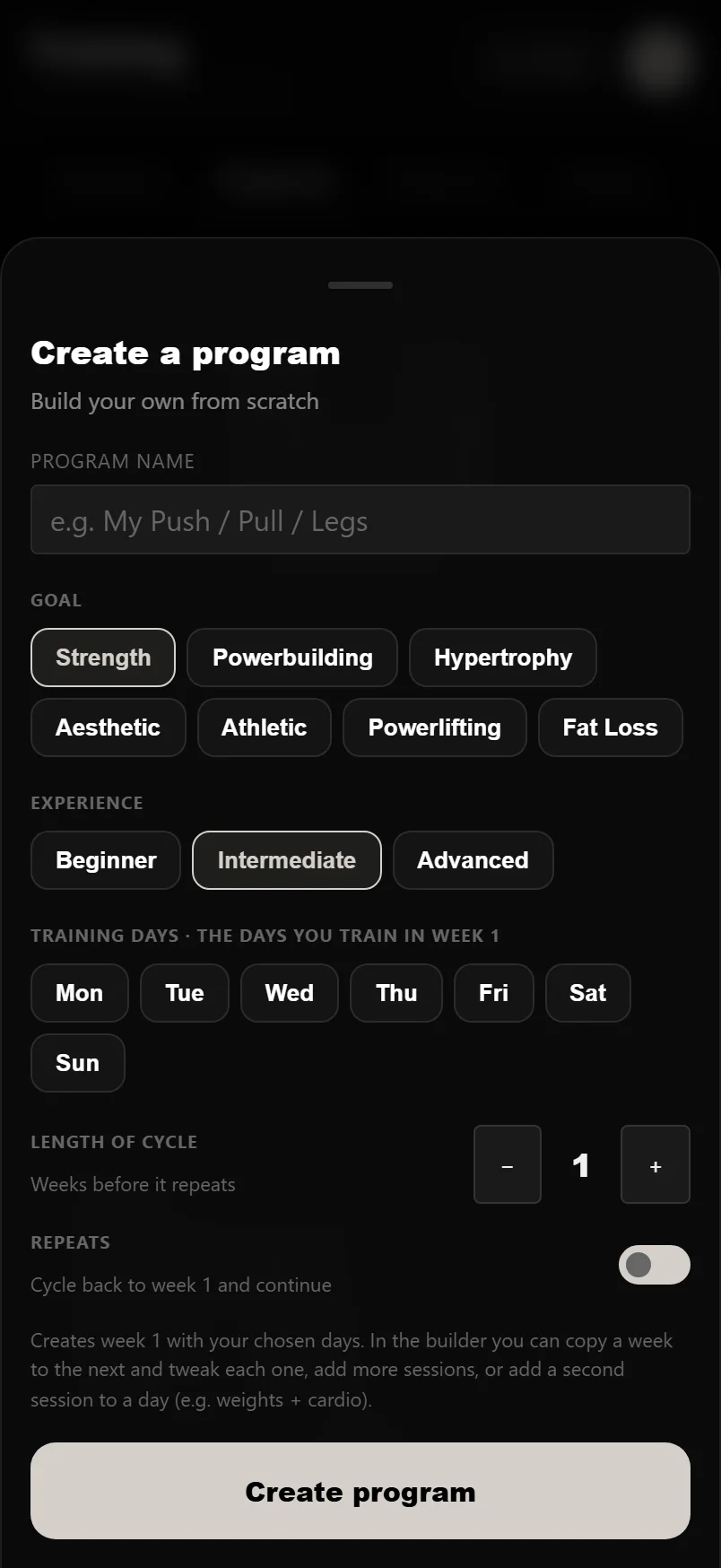
Training days are just the week-one schedule — you can move sessions around afterwards. Start with the split you know you'll keep (see our guide on choosing a program) rather than the most ambitious one.
Adding exercises to each day
Each training day starts as an empty session. Open a day and add exercises from the full library — search by name, and every exercise brings its how-to video and form notes with it. For each exercise you set the number of sets and the target reps, just as you would in the logger. Order them how you'll actually perform them: compounds first, accessories after.
As you build, DropSet shows live balance charts of how much work each muscle group is getting across the program, so you can spot an over- or under-trained area before you ever run it — a push-heavy week with no pulling shows up immediately. Add, remove and reorder freely until each day looks right; nothing is logged yet, so this is a safe space to experiment.
Turning on automatic progression
This is what separates a program from a plain list of exercises. For each exercise you can attach a progression rule, and DropSet then works out the next target for you every session. Linear progression adds a set amount each session — the classic beginner driver. Double progression has you add reps within a range first, then increase the weight and drop the reps back down — ideal for accessory and hypertrophy work. Training-max percentage runs the exercise off a percentage of a training max, the model behind percentage-based strength programs. Or leave an exercise on no progression if you'd rather drive it by feel.
Once progression is set, running your program feels exactly like running a built-in one: you open the session, the weights are already filled in based on last time and the rule, you lift, and next session's targets update automatically. You built the plan; the app handles the arithmetic of getting stronger at it.
Match the rule to the lift: linear on your main compounds while you can still add weight each session, double progression on accessories. See our progressive overload guide for why.
Running and editing it
When the program is ready, start it — it becomes your active program, schedules its sessions and shows up on your dashboard like any catalog plan. From there you just train: open each day's session, log your sets, and DropSet advances the weights for the next time according to the rules you set. Your logged history is kept whatever you change.
Nothing is locked in. You can edit any day, swap exercises, adjust sets, reps or progression, add or remove training days, or change the length at any point — the program updates without losing your progress. Build a rough first version, run it for a few weeks, and refine it as you learn what fits. That's the advantage of building your own: it bends to you instead of the other way round.
Common questions
How do I create a custom program in DropSet?
Open the Programs tab, choose Create a program ('Build your own from scratch'), set a name and your training days, then add exercises to each day and attach a progression rule. Start it and it runs like any built-in program, with the weights worked out for you.
Can I set automatic progression on my own program?
Yes — that's the point of building it in DropSet rather than writing it on paper. Each exercise can use linear progression, double progression, or training-max percentages, and the app then calculates your next target every session automatically.
Can I edit a custom program after I've started it?
Any time. Change exercises, sets, reps, progression, training days or the program length whenever you like — your logged history is kept and progress isn't lost. Build a rough version first and refine it as you go.
What's the difference between a routine and a program?
A routine is a single workout (one day). A program is a structured collection of routines across a week or cycle, with progression and scheduling. The builder creates a program and one routine for each training day you choose.
Do I have to build from scratch, or can I copy a built-in program?
Both work. You can build entirely from scratch, or start a built-in program from the catalogue and edit it to taste — swapping exercises and adjusting sets, reps or progression. Either way you end up with a program that's yours.
Put it into practice
DropSet is free during beta — 50 proven programs, automatic progression, rest timers and PR tracking, all on your phone.